[](https://github.com/sponsors/007revad)
[](https://user-badge.committers.top/australia/007revad)
### Description
Enable creating volumes with non-Synology M.2 drives
This script will:
- Enable creating M.2 storage pools and volumes all from within Storage Manager.
- Enable Health Info for non-Synology NVMe drives.
It will work for DSM 7.2 and some models running DSM 7.1.1. As for a full list of which models it will work with, I don't know yet. I do know it does work on models listed by Synology as supported for creating M.2 volumes, and some '21 and newer enterprise models.
**Confirmed working on:**
| Model | CPU Arch | DSM version | Works | Note |
| ------------ |----------|--------------------------|-------|------|
| **E10M20-T1** | | ALL | **No** | Use Synology_M2_volume |
| **M2D20** | | ALL | **No** | Use Synology_M2_volume |
| **M2D18** | | ALL | **No** | Use Synology_M2_volume |
||
| DS923+ | R1000 | DSM 7.2-64570 Update 3 | yes |
| DS923+ | R1000 | DSM 7.2-64561 | yes |
| DS923+ | R1000 | DSM 7.1.1-42962 Update 4 | yes |
| DS723+ | R1000 | DSM 7.2-64570 Update 3 | yes |
| DS423+ | Geminilake | DSM 7.1.1-42962 Update 5 | yes |
| DS3622xs+ | Broadwellnk | DSM 7.2-64570 Update 3 | **No** | M.2 panel missing in storage manager |
| DS3622xs+ | Broadwellnk | DSM 7.2-64561 | yes |
| DS3622xs+ | Broadwellnk | DSM 7.1.1-42962 Update 4 | yes |
| DS3622xs+ | Broadwellnk | DSM 7.1.1-42962 Update 1 | **No** | Use newer DSM version |
| RS4021xs+ | Broadwellnk | DSM 7.2-64570 Update 3 | **No** | M.2 panel missing in storage manager |
| RS4021xs+ | Broadwellnk | DSM 7.2-64561 | yes |
| RS4021xs+ | Broadwellnk | DSM 7.1.1-42962 Update 2 | yes |
| DS1821+ | V1000 | DSM 7.2-64570 Update 3 | yes |
| DS1821+ | V1000 | DSM 7.2-64570 Update 2 | yes |
| DS1821+ | V1000 | DSM 7.2-64570 Update 1 | yes |
| DS1821+ | V1000 | DSM 7.2-64570 | yes |
| DS1821+ | V1000 | DSM 7.2-64561 | yes |
| DS1621xs+ | Broadwellnk | DSM 7.2-64570 Update 3 | yes |
| DS1621xs+ | Broadwellnk | DSM 7.2-64570 Update 1 | yes |
| DS1522+ | R1000 | DSM 7.2-64561 | yes |
| DS1522+ | R1000 | DSM 7.1.1-42962 Update 4 | **No** | Use newer DSM version |
| DS1520+ | Geminilake | DSM 7.2.1-69057 | yes |
| DS1019+ | Apollolake | DSM 7.2-64570 Update 3 | yes |
| DS1019+ | Apollolake | DSM 7.2-64570 Update 1 | yes |
| DS1019+ | Apollolake | DSM 7.2-64561 | yes |
| DS920+ | Geminilake | DSM 7.2.1-69057 Update 2 | yes |
| DS920+ | Geminilake | DSM 7.2.1-69057 Update 1 | yes |
| DS920+ | Geminilake | DSM 7.2.1-69057 | yes |
| DS920+ | Geminilake | DSM 7.2-64570 Update 3 | yes |
| DS920+ | Geminilake | DSM 7.2-64570 Update 1 | yes |
| DS920+ | Geminilake | DSM 7.2-64561 | yes |
| DS920+ | Geminilake | DSM 7.1.1-42962 Update 5 | yes |
| DS920+ | Geminilake | DSM 7.1.1-42962 Update 4 | **No** | Use newer DSM version |
| DS720+ | Geminilake | DSM 7.2.1-69057 | yes |
| DS720+ | Geminilake | DSM 7.2-64570 Update 3 | yes |
| DS720+ | Geminilake | DSM 7.2-64561 | yes |
| DS420+ | Geminilake | DSM 7.2-64561 | yes |
| DS918+ | Apollolake | DSM 7.2-64570 Update 3 | yes |
| DS918+ | Apollolake | DSM 7.2-64561 | yes |
| DS918+ | Apollolake | DSM 7.1.1-42962 Update 5 | **No** | Use newer DSM version |
| DS3617xs | Broadwell | DSM 7.x | **No** | Not working with any DSM version |
### How is this different to the Synology_M2_volume script?
- **Synology_enable_M2_volume:**
- Allows creating an M.2 storage pool and volume all from within Storage Manager with any brand M.2 drive.
- Gives you the option of **SHR and JBOD**, as well as RAID 0, RAID 1 and Basic.
- Enables Health Info for non-Synology NVMe drives.
- Add drive(s) and change RAID type work from within Storage Manager.
- RAID repair and expansion work from within Storage Manager.
- Easy to run as there a no questions to answer.
- Works with DSM 7.2 beta and 7.1.1 (may work with DSM 7.1 and 7.0).
- Works with any brand M.2 drives.
- May only work with models Synology listed as supporting M.2 volumes.
- Does **NOT** work for M.2 drives in a M2D20, M2D18, M2D17 or E10M20-T1.
- Does **NOT** allow creating a storage pool/volume spanning internal NVMe drives and NVMe drives in a Synology M.2 PCIe card.
- **Synology_M2_volume:**
- Creates the synology partitions.
- Creates the storage pool.
- Requires you to do an Online Assemble in Storage Manager before you can create your volume.
- A little more complicated as there are questions that you need to answer.
- Gives you the option of Basic, RAID 0, RAID 1, **RAID 5**, **RAID 6** and **RAID 10**.
- Works with any DSM version.
- Works with any brand M.2 drives.
- Works with any Synology model that has M.2 slots or can install a Synology PCIe M.2 card.
- Works for M.2 drives in a M2D20, M2D18, M2D17 or E10M20-T1.
- Works for creating a storage pool/volume spanning internal NVMe drives and NVMe drives in a Synology M.2 PCIe card.
| Feature | Synology_enable_M2_volume | Synology_M2_volume |
|--------------------------|-----------------------------------------------|-----------------------------------|
| Non-Synology M.2 drives | Yes | Yes |
| Ease of use | Easy | Medium |
| Prompts for answers | No | Yes, multiple times |
| Online Assemble required | No | DSM 7 Yes - DSM 6 No |
| RAID levels supported | Basic, RAID 0, RAID 1, **SHR**, **JBOD**, **RAID F1** (see Note) | Basic, RAID 0, 1, **5, 6 and 10** (see Note 2) |
| Add drive(s) to RAID | Yes, via Storage Manager | No |
| Change RAID type | Yes, via Storage Manager | No |
| RAID repair | Yes, via Storage Manager | No |
| RAID expansion | Yes, via Storage Manager | No |
| NVMe Health Info | Yes | No |
| DSM version | DSM 7.2 (and 7.1.1 for some NAS models) | Any DSM version |
| M.2 drive location | Internal M.2 slots only | Internal M.2 and **Synology M.2 PCie cards** |
| Span internal/PCIe NVMes | No | Yes |
| What it does | Edits 1 file in DSM | Creates partitons on M.2 drive(s) |
***Note:*** RAID F1 requires a Synology model that supports RAID F1.
***Note 2:*** RAID 5 requires 3 or more NVMe drives. RAID 6 and 10 require 4 or more NVMe drives.
If you run this script then use Storage Manager to create your M.2 storage pool and volume and then run the script again with the --restore option to restore the original setting your storage pool and volume survive and the annoying notifications and warnings are gone.
Your volume also survives reboots and DSM updates.
### Download the script
See How to download the script for the easiest way to download the script.
## How to run the script
### Running the script via SSH
**Note:** Replace /volume1/scripts/ with the path to where the script is located.
1. Run the script then reboot the Synology:
```YAML
sudo -i /volume1/scripts/syno_enable_m2_volume.sh
```
2. Go to Storage Manager and create your M.2 storage pool and volume(s).
**Options:**
```YAML
-c, --check Check value in file and backup file
-r, --restore Restore backup to undo changes
-n, --noreboot Don't reboot after script has run
-e, --email Disable colored text in output scheduler emails
--autoupdate=AGE Auto update script (useful when script is scheduled)
AGE is how many days old a release must be before
auto-updating. AGE must be a number: 0 or greater
-h, --help Show this help message
-v, --version Show the script version
```
**Extra Steps:**
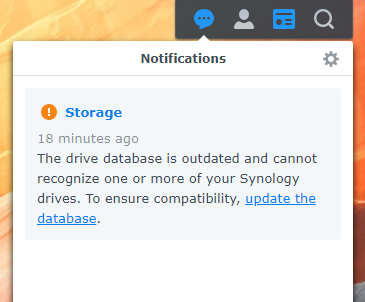
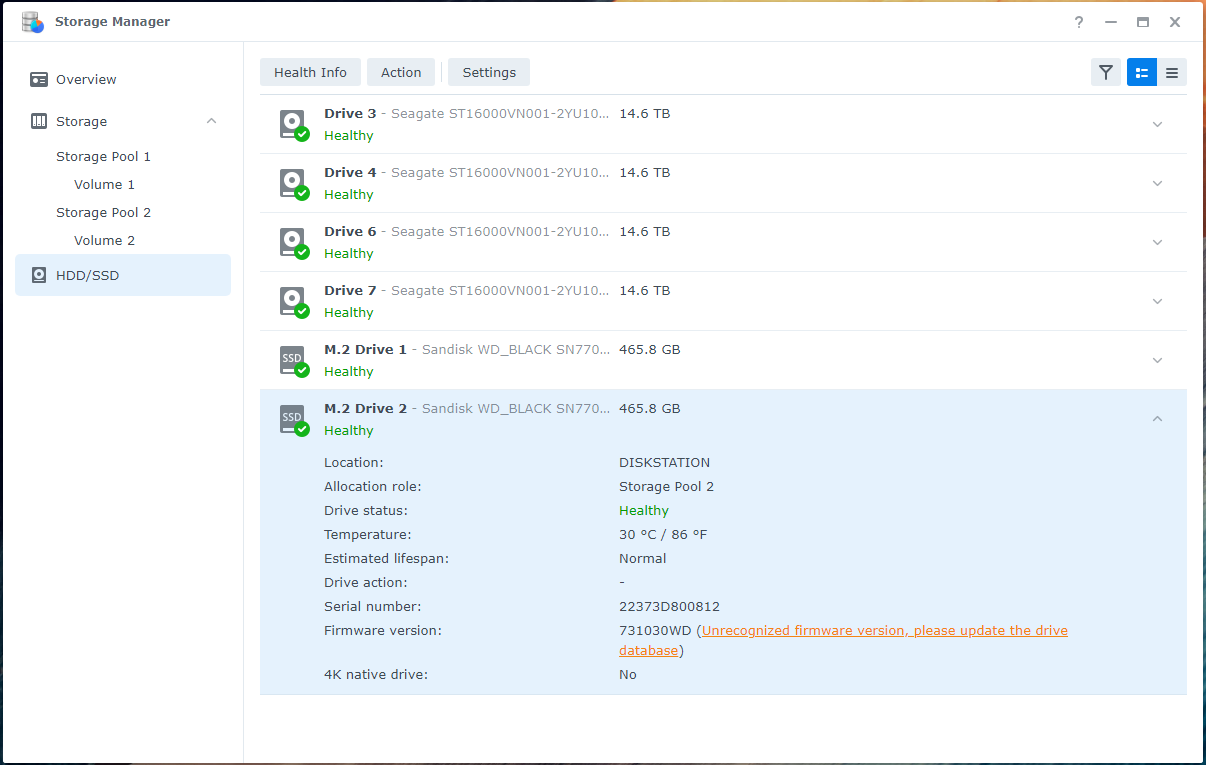
To get rid of drive database outdated notifications and unrecognised firmware warnings run Synology_HDD_db which will add your drives to DSM's compatibile drive databases, and prevent the drive compatability databases being updated between DSM updates.
```YAML
sudo -i /path-to-script/syno_hdd_db.sh --noupdate
```
### What about DSM updates?
After any DSM update you will need to run this script, and the Synology_HDD_db script again.
### Schedule the script to run at shutdown
Or you can schedule Synology_enable_M2_volume to run when the Synology shuts down and Synology_HDD_db to run when the Synology boots up, to avoid having to remember to run both scripts after a DSM update.
See How to schedule a script in Synology Task Scheduler
## Screenshots
Here's the result after running the script and rebooting. Note that the strorage pool is being created in Storage Manager and there's no Online Assembly needed. SHR and JBOD are also available.
[](https://github.com/sponsors/007revad)
[](https://user-badge.committers.top/australia/007revad)
### Description
Enable creating volumes with non-Synology M.2 drives
This script will:
- Enable creating M.2 storage pools and volumes all from within Storage Manager.
- Enable Health Info for non-Synology NVMe drives.
It will work for DSM 7.2 and some models running DSM 7.1.1. As for a full list of which models it will work with, I don't know yet. I do know it does work on models listed by Synology as supported for creating M.2 volumes, and some '21 and newer enterprise models.
**Confirmed working on:**
| Model | CPU Arch | DSM version | Works | Note |
| ------------ |----------|--------------------------|-------|------|
| **E10M20-T1** | | ALL | **No** | Use Synology_M2_volume |
| **M2D20** | | ALL | **No** | Use Synology_M2_volume |
| **M2D18** | | ALL | **No** | Use Synology_M2_volume |
||
| DS923+ | R1000 | DSM 7.2-64570 Update 3 | yes |
| DS923+ | R1000 | DSM 7.2-64561 | yes |
| DS923+ | R1000 | DSM 7.1.1-42962 Update 4 | yes |
| DS723+ | R1000 | DSM 7.2-64570 Update 3 | yes |
| DS423+ | Geminilake | DSM 7.1.1-42962 Update 5 | yes |
| DS3622xs+ | Broadwellnk | DSM 7.2-64570 Update 3 | **No** | M.2 panel missing in storage manager |
| DS3622xs+ | Broadwellnk | DSM 7.2-64561 | yes |
| DS3622xs+ | Broadwellnk | DSM 7.1.1-42962 Update 4 | yes |
| DS3622xs+ | Broadwellnk | DSM 7.1.1-42962 Update 1 | **No** | Use newer DSM version |
| RS4021xs+ | Broadwellnk | DSM 7.2-64570 Update 3 | **No** | M.2 panel missing in storage manager |
| RS4021xs+ | Broadwellnk | DSM 7.2-64561 | yes |
| RS4021xs+ | Broadwellnk | DSM 7.1.1-42962 Update 2 | yes |
| DS1821+ | V1000 | DSM 7.2-64570 Update 3 | yes |
| DS1821+ | V1000 | DSM 7.2-64570 Update 2 | yes |
| DS1821+ | V1000 | DSM 7.2-64570 Update 1 | yes |
| DS1821+ | V1000 | DSM 7.2-64570 | yes |
| DS1821+ | V1000 | DSM 7.2-64561 | yes |
| DS1621xs+ | Broadwellnk | DSM 7.2-64570 Update 3 | yes |
| DS1621xs+ | Broadwellnk | DSM 7.2-64570 Update 1 | yes |
| DS1522+ | R1000 | DSM 7.2-64561 | yes |
| DS1522+ | R1000 | DSM 7.1.1-42962 Update 4 | **No** | Use newer DSM version |
| DS1520+ | Geminilake | DSM 7.2.1-69057 | yes |
| DS1019+ | Apollolake | DSM 7.2-64570 Update 3 | yes |
| DS1019+ | Apollolake | DSM 7.2-64570 Update 1 | yes |
| DS1019+ | Apollolake | DSM 7.2-64561 | yes |
| DS920+ | Geminilake | DSM 7.2.1-69057 Update 2 | yes |
| DS920+ | Geminilake | DSM 7.2.1-69057 Update 1 | yes |
| DS920+ | Geminilake | DSM 7.2.1-69057 | yes |
| DS920+ | Geminilake | DSM 7.2-64570 Update 3 | yes |
| DS920+ | Geminilake | DSM 7.2-64570 Update 1 | yes |
| DS920+ | Geminilake | DSM 7.2-64561 | yes |
| DS920+ | Geminilake | DSM 7.1.1-42962 Update 5 | yes |
| DS920+ | Geminilake | DSM 7.1.1-42962 Update 4 | **No** | Use newer DSM version |
| DS720+ | Geminilake | DSM 7.2.1-69057 | yes |
| DS720+ | Geminilake | DSM 7.2-64570 Update 3 | yes |
| DS720+ | Geminilake | DSM 7.2-64561 | yes |
| DS420+ | Geminilake | DSM 7.2-64561 | yes |
| DS918+ | Apollolake | DSM 7.2-64570 Update 3 | yes |
| DS918+ | Apollolake | DSM 7.2-64561 | yes |
| DS918+ | Apollolake | DSM 7.1.1-42962 Update 5 | **No** | Use newer DSM version |
| DS3617xs | Broadwell | DSM 7.x | **No** | Not working with any DSM version |
### How is this different to the Synology_M2_volume script?
- **Synology_enable_M2_volume:**
- Allows creating an M.2 storage pool and volume all from within Storage Manager with any brand M.2 drive.
- Gives you the option of **SHR and JBOD**, as well as RAID 0, RAID 1 and Basic.
- Enables Health Info for non-Synology NVMe drives.
- Add drive(s) and change RAID type work from within Storage Manager.
- RAID repair and expansion work from within Storage Manager.
- Easy to run as there a no questions to answer.
- Works with DSM 7.2 beta and 7.1.1 (may work with DSM 7.1 and 7.0).
- Works with any brand M.2 drives.
- May only work with models Synology listed as supporting M.2 volumes.
- Does **NOT** work for M.2 drives in a M2D20, M2D18, M2D17 or E10M20-T1.
- Does **NOT** allow creating a storage pool/volume spanning internal NVMe drives and NVMe drives in a Synology M.2 PCIe card.
- **Synology_M2_volume:**
- Creates the synology partitions.
- Creates the storage pool.
- Requires you to do an Online Assemble in Storage Manager before you can create your volume.
- A little more complicated as there are questions that you need to answer.
- Gives you the option of Basic, RAID 0, RAID 1, **RAID 5**, **RAID 6** and **RAID 10**.
- Works with any DSM version.
- Works with any brand M.2 drives.
- Works with any Synology model that has M.2 slots or can install a Synology PCIe M.2 card.
- Works for M.2 drives in a M2D20, M2D18, M2D17 or E10M20-T1.
- Works for creating a storage pool/volume spanning internal NVMe drives and NVMe drives in a Synology M.2 PCIe card.
| Feature | Synology_enable_M2_volume | Synology_M2_volume |
|--------------------------|-----------------------------------------------|-----------------------------------|
| Non-Synology M.2 drives | Yes | Yes |
| Ease of use | Easy | Medium |
| Prompts for answers | No | Yes, multiple times |
| Online Assemble required | No | DSM 7 Yes - DSM 6 No |
| RAID levels supported | Basic, RAID 0, RAID 1, **SHR**, **JBOD**, **RAID F1** (see Note) | Basic, RAID 0, 1, **5, 6 and 10** (see Note 2) |
| Add drive(s) to RAID | Yes, via Storage Manager | No |
| Change RAID type | Yes, via Storage Manager | No |
| RAID repair | Yes, via Storage Manager | No |
| RAID expansion | Yes, via Storage Manager | No |
| NVMe Health Info | Yes | No |
| DSM version | DSM 7.2 (and 7.1.1 for some NAS models) | Any DSM version |
| M.2 drive location | Internal M.2 slots only | Internal M.2 and **Synology M.2 PCie cards** |
| Span internal/PCIe NVMes | No | Yes |
| What it does | Edits 1 file in DSM | Creates partitons on M.2 drive(s) |
***Note:*** RAID F1 requires a Synology model that supports RAID F1.
***Note 2:*** RAID 5 requires 3 or more NVMe drives. RAID 6 and 10 require 4 or more NVMe drives.
If you run this script then use Storage Manager to create your M.2 storage pool and volume and then run the script again with the --restore option to restore the original setting your storage pool and volume survive and the annoying notifications and warnings are gone.
Your volume also survives reboots and DSM updates.
### Download the script
See How to download the script for the easiest way to download the script.
## How to run the script
### Running the script via SSH
**Note:** Replace /volume1/scripts/ with the path to where the script is located.
1. Run the script then reboot the Synology:
```YAML
sudo -i /volume1/scripts/syno_enable_m2_volume.sh
```
2. Go to Storage Manager and create your M.2 storage pool and volume(s).
**Options:**
```YAML
-c, --check Check value in file and backup file
-r, --restore Restore backup to undo changes
-n, --noreboot Don't reboot after script has run
-e, --email Disable colored text in output scheduler emails
--autoupdate=AGE Auto update script (useful when script is scheduled)
AGE is how many days old a release must be before
auto-updating. AGE must be a number: 0 or greater
-h, --help Show this help message
-v, --version Show the script version
```
**Extra Steps:**
To get rid of drive database outdated notifications and unrecognised firmware warnings run Synology_HDD_db which will add your drives to DSM's compatibile drive databases, and prevent the drive compatability databases being updated between DSM updates.
```YAML
sudo -i /path-to-script/syno_hdd_db.sh --noupdate
```
### What about DSM updates?
After any DSM update you will need to run this script, and the Synology_HDD_db script again.
### Schedule the script to run at shutdown
Or you can schedule Synology_enable_M2_volume to run when the Synology shuts down and Synology_HDD_db to run when the Synology boots up, to avoid having to remember to run both scripts after a DSM update.
See How to schedule a script in Synology Task Scheduler
## Screenshots
Here's the result after running the script and rebooting. Note that the strorage pool is being created in Storage Manager and there's no Online Assembly needed. SHR and JBOD are also available.
After reboot I got some notifications saying the M.2 drives can be managed

No M2 Storage Pool or Volume yet

Non-Synology M.2 drives

Create Storage Pool 2

I wonder if RAID 5 and SHR-2 would be available if I had four M.2 drives.
RAID choices including SHR and JBOD

Select my non-Synology M.2 drives

We have an SHR M.2 storage pool

Create Volume 2

Finished Creating Volume 2